Webinar vs Video Conference: Key Differences for Better Online Communication
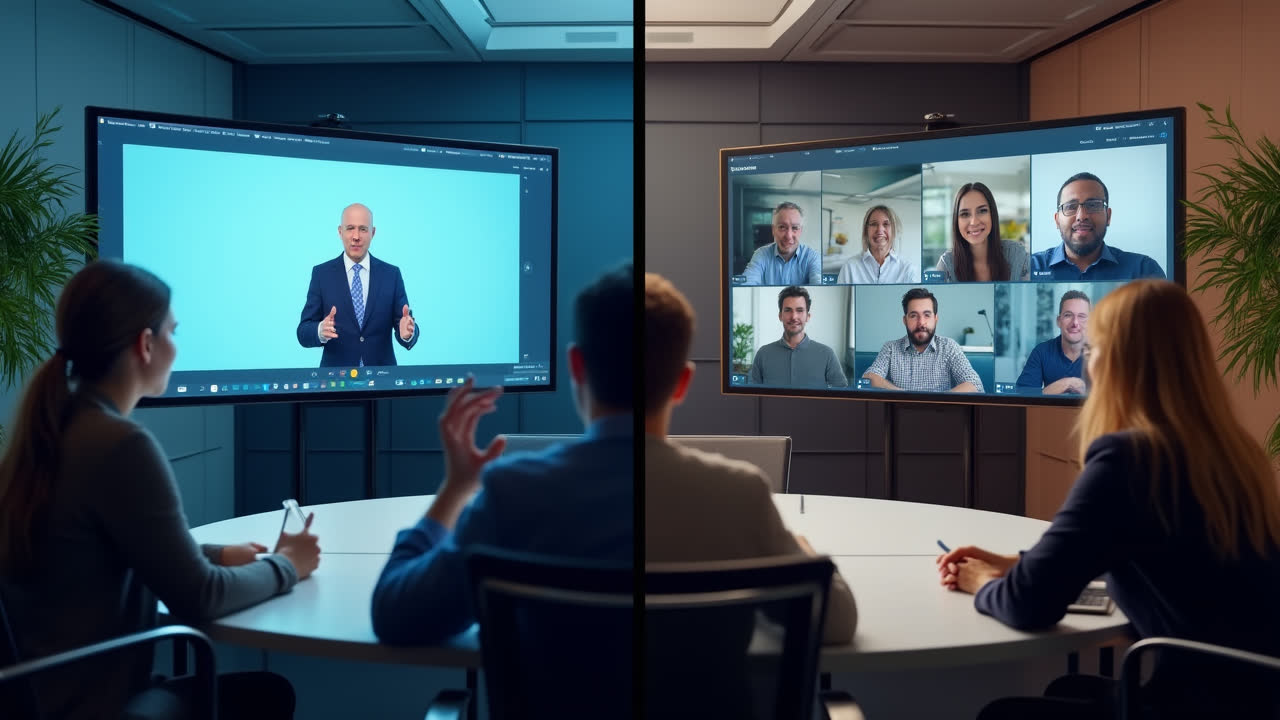
In today's digital business landscape, virtual communication tools have become essential for connecting with colleagues, clients, and audiences worldwide. Among these tools, webinars and video conferences stand out as popular options, yet many professionals still confuse the two or use the terms interchangeably. Understanding the fundamental differences between these communication methods can help you choose the right tool for your specific needs and optimize your virtual meetings.
The main distinction lies in their communication style: webinars primarily offer one-way communication from presenter to audience with limited interaction possibilities, while video conferences enable multi-directional communication among all participants. But the differences don't end there—let's dive deeper into what sets these virtual meeting formats apart and when to use each one.
What is a Webinar?
A webinar, short for "web-based seminar," is a virtual presentation, workshop, or lecture delivered to a remote audience via the internet. Think of it as a digital stage where one or a few presenters share information with a potentially large audience. The term itself suggests its purpose—bringing seminar-style learning to the web.
Webinars are designed primarily for knowledge dissemination and typically follow a structured format with prepared content. Have you ever registered for an online training session where you mostly listened to experts speak? That was likely a webinar. These events usually require pre-registration and can accommodate hundreds or even thousands of attendees, making them perfect for reaching large audiences efficiently.
The technology behind webinars prioritizes stable broadcasting capabilities, allowing presenters to share their screens, display slides, play videos, and demonstrate software with minimal technical difficulties. Most webinar platforms offer features like polls, Q&A sections, and chat windows to facilitate some degree of audience participation, but these interactions remain controlled by the presenter. This controlled environment makes webinars ideal for educational content, product demonstrations, and marketing presentations where message consistency is crucial.
What is a Video Conference?
A video conference is a real-time visual connection between two or more participants located in different places. Unlike webinars, video conferences aim to recreate face-to-face meeting experiences virtually, allowing all participants to see and hear one another simultaneously. The emphasis here is on collaboration rather than presentation.
When you join a video conference, you're expected to actively participate in the conversation. Everyone typically has equal ability to speak, share their screen, and contribute to the discussion. This democratic approach makes video conferencing particularly valuable for team meetings, project collaborations, and situations where input from all participants matters.
The technical requirements for video conferences differ from webinars as well. All participants need working microphones, speakers or headphones, and webcams to fully engage in the meeting. The quality of each participant's internet connection directly impacts the overall experience, as does their environment—background noise, lighting, and distractions can all affect the meeting's flow. Despite these challenges, video conferencing offers an unmatched level of personal connection and immediate feedback that makes it invaluable for maintaining relationships with remote teams and clients.
I've found that successful video conferences often require more coordination than webinars. When everyone has the ability to speak, establishing clear protocols for who talks when becomes important. Have you noticed how productive video meetings usually have someone facilitating to prevent people from talking over one another? This skill becomes increasingly important as the number of participants grows.
Key Differences Between Webinars and Video Conferences
| Feature | Webinar | Video Conference |
|---|---|---|
| Communication Style | Primarily one-way (presenter to audience) | Multi-directional (all participants) |
| Audience Interaction | Limited (usually through chat, Q&A, polls) | Full interaction (everyone can speak and be seen) |
| Participant Capacity | Typically larger (hundreds or thousands) | Usually smaller (5-50 people for optimal experience) |
| Technical Requirements | Minimal for attendees (mainly viewing capabilities) | More equipment needed (cameras, microphones for all) |
| Purpose | Knowledge dissemination, marketing, training | Collaboration, discussion, relationship building |
| Recording Value | High (often designed to be watched later) | Medium (may lose context when viewed later) |
| Structure | Highly structured with prepared content | More flexible and spontaneous |
| Cost Efficiency | More cost-effective for large audiences | More cost-effective for small group collaboration |
When to Use a Webinar vs. a Video Conference
Choosing between a webinar and a video conference depends largely on your communication goals and audience size. Webinars shine when you need to deliver consistent information to many people simultaneously. They're particularly effective for product launches, educational workshops, and marketing events where controlling the message is important.
I recently attended a webinar on digital marketing trends that perfectly illustrated this format's strengths. The presenters shared valuable insights with over 500 attendees, used polls to gather our opinions, and addressed selected questions during designated Q&A segments. The structure kept the event moving efficiently while still providing some interaction—a balance that would have been impossible in a traditional video conference with that many participants.
Video conferences, on the other hand, excel when genuine dialogue and relationship building are your priorities. Team meetings, client consultations, and collaborative work sessions benefit from the immediate feedback and personal connection that video conferences provide. The smaller participant count encourages more meaningful exchanges and allows everyone to contribute to the conversation.
Sometimes the line between these formats blurs. Have you participated in "hybrid" events that begin with a presentation-style segment before breaking into smaller discussion groups? These approaches combine elements of both webinars and video conferences to maximize engagement while still delivering structured content. As communication technology continues to evolve, we're likely to see even more creative combinations of these formats.
Technical Considerations and Best Practices
The success of both webinars and video conferences depends heavily on proper technical preparation. For webinars, presenters should invest in reliable broadcasting software, stable internet connections, and good audio equipment to ensure clear delivery. Testing all presentation materials beforehand can prevent embarrassing technical glitches during the live event.
Video conference participants face their own set of technical challenges. Background noise can be particularly disruptive in collaborative meetings, making headphones with noise-canceling microphones valuable investments for frequent participants. Lighting also plays a crucial role—I've found that positioning a light source in front of your face rather than behind you dramatically improves how clearly others can see you.
Beyond technical considerations, effective virtual communication requires adapting your presentation style to the medium. Webinar presenters should incorporate interactive elements every 5-10 minutes to maintain audience engagement, while video conference participants benefit from clear speaking turns and concise contributions. In both formats, visual aids should be simple and readable on small screens, acknowledging that many attendees may join from tablets or phones.
Perhaps the most overlooked aspect of virtual meetings is preparation. Taking a few minutes to familiarize yourself with the platform's features before joining can save considerable time and frustration. This is especially true for webinar attendees who might need to download specific software or browser extensions to participate fully. A little preparation goes a long way toward ensuring a smooth virtual communication experience.
Frequently Asked Questions
Can I convert a webinar into a video conference mid-session?
While technically possible on some platforms, converting a webinar to a video conference mid-session is generally not recommended. The two formats have different technical setups and participant expectations. Instead, consider planning a hybrid approach from the start, with a clear webinar portion followed by breakout rooms or an open discussion period. This gives participants proper notice and allows you to prepare accordingly. Most webinar platforms now offer features that allow for some degree of transition between presentation and discussion modes.
Which requires more bandwidth: webinars or video conferences?
Video conferences typically require more bandwidth than webinars for individual participants. This is because in a video conference, everyone is simultaneously sending and receiving audio and video data, creating multiple data streams. In a webinar, most participants are only receiving data from the presenter(s), requiring less overall bandwidth per person. If you have limited internet connectivity, you might experience fewer issues attending a webinar than participating in a video conference. For hosting either type of event, a stable high-speed connection is essential to ensure quality transmission.
How do webinars and video conferences differ in terms of audience engagement metrics?
Webinars and video conferences track different engagement metrics due to their distinct formats. Webinar platforms typically measure registration rates, attendance rates, viewing duration, poll participation, question submissions, and on-demand viewing after the live event. Video conference metrics focus more on participation equality, speaking time distribution, screen sharing frequency, and meeting duration. The difference reflects their purposes: webinars aim to deliver content effectively to a passive audience, while video conferences prioritize active participation from all attendees. When evaluating success, consider which metrics align with your communication goals rather than applying the same standards to both formats.
Conclusion
The distinction between webinars and video conferences goes beyond simple terminology—it represents fundamentally different approaches to virtual communication. Webinars facilitate one-to-many knowledge sharing with controlled interaction, while video conferences enable collaborative many-to-many discussions where every participant has equal communication rights.
As remote work and digital communication continue to shape our professional landscape, mastering both formats becomes increasingly valuable. By understanding when to use each tool and how to optimize your approach accordingly, you can significantly improve your virtual communication effectiveness and build stronger connections with colleagues, clients, and audiences worldwide.
Remember that technology continues to evolve, blurring the lines between these formats and introducing new capabilities regularly. The most successful communicators stay flexible, experimenting with different approaches and adapting to both the technical possibilities and the human needs that drive meaningful connection—whether in a structured webinar or a collaborative video conference.